Friday, August 11, 2017

Learner Engagement... 'Me and My School'

I was privileged to attend a NZCER 'Me and My School' Learner Engagement Survey Workshop.

"Me and My School is a unique, research-based student engagement survey designed for New Zealand students Years 4 to 10. It offers a snapshot of the learning culture in your school, standardised data to track progress over time and a nationally referenced gender, ethnicity, and year level comparison." - NZCER

Why 'Me and My School'? (Theory of Action)
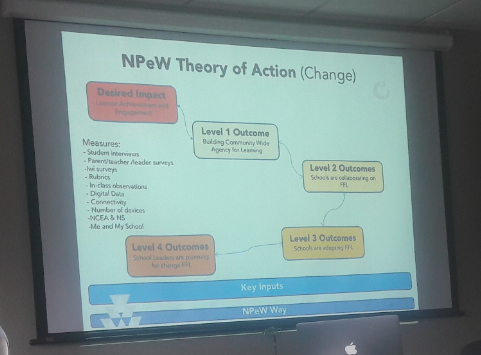
Outcomes of using 'Me and My school':
- Impact of NPeW
- Potential link to other data
- Useful assessment at multiple level (schools, CoLs, District)
- Input into school strategic plans for 2018

What does the survey measures? 3 main aspects: - Behavioural - Effective / emotional - Cognitive (willing to try new things??) Links to the Key Competencies

Getting staff ready for online survey:

- Use demo sites to introduce staff - Teachers need to talk students through 'instructions' & 'about me' parts - When students start with survey, advised that teacher should not be walking around, due to anonymous nature

Results: - With online reports you can view interim reports - Making sense of the reports - lots of different ways that data can be looked at / intrepid. Tips: Think about protocols on how to administer - maybe get students to all do it together in class or think about how it works best for your students. If someone is away, get them to do it when they are back. Aim to get all students to partake.

Conclusion:
This assessment tool is designed to give a school robust and systematic information about student engagement.


~ "Measure what you value instead of valuing only what you can measure" - Andy Hargreaves ~

Wednesday, August 2, 2017

Digital Technologies / Hangarau Matihiko Consultation

I have been really interested in attending the consultation sessions, since the official announcement in regards to the addition to the New Zealand Curriculum from Education Minister Nikki Kaye and as Digital Technologies|Hangarau Matihiko is to be formally added into the NZ Curriculum by 2018 and fully integrated by 2020.

My notes:
Leadership / BOT session - 9.00am - 12.00pm
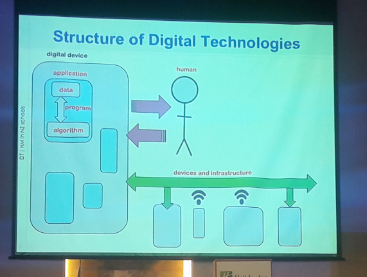
When thinking of DT, think about people using it.
Digital supports arts, science etc. It is not standing alone.

Timeline:

What is needed to teach DTIHM?:

Algorithms are not new to us. Give students the opportunity to learn the language.


- Writing a program brings the algorithm to life.
- Computational thinking is about how to create something new.


In Technological Areas part - (‘Computational thinking for digital technologies’ & ‘Designing and developing digital outcomes’) are the new part of the Curriculum.

How would you start a conversation about DT in your school? What does it look like? What is it about? 
- Take away the ‘plugged’ element
- Unplugged/ de-plugged (http://csunplugged.org/)


It is not about the pc that sits on the desk, but the pc that sits in the mind. Schools have autonomy on how to implement.


Teachers' session - 1.00pm - 3.00pm

Students should be "doing" computational thinking without computer / numbers (using alphabet)
How would you explain this whole new digital world to primary schools?
This is not about tech hardware, it’s about our brain.
We have a role as navigators and guides to our children

Creating with technology can have students feel ownership.


Algorithm comes up quite a lot in the new curriculum. All data is represented by using 2 values (binary code). A bit is the smallest bit of information...


As I am really passionate about technologies and how it can be used to support learning, I am looking forward to the implementation and embedding of ‘Computational thinking for digital technologies’ & ‘Designing and developing digital outcomes’ in learning by 2020.


Additional links:
- Strengthening Digital Technologies Hangarau Matihiko in the Curriculum - A collaborative Doc created by Allanah King.
- Digital technology | Hangarau matihiko curriculum consultation: Workshop video
- Blog post by Sonya Van Schaijik


~ "Technology opens the door to the world. It's up to us to walk through it in a meaning ful and respectful way." - Unknown ~

Friday, July 21, 2017

Saying 'good-bye'... it's not easy

Due to many commitments, I had to make a serious decision regarding my ever growing workload and responsibilities. I realised that I will have to let go [at least] one of the many initiatives I am involved in. It was with a heavy heart and after pondering for many weeks, that I made the decision to withdraw myself as co-organiser from KidsedchatNZ at this moment in time. 

I feel humbled with the replies from the members of the team:


More feedback...


... and then this blog post:

"KidsedchatNZ: Crew Vacancy


Tena koutou KidsedchatNZ whānau

We have some changes afoot with our KidsedchatNZ organising crew. We are sadly farewelling the magnificent Marnel van der Spuy from our team.

Marnel has been one of our co-organisers from our very inception, and has contributed masses of her own time and energy into making our chat the great tool that it is for New Zealand kids to connect. 

Thank you so much Marnel, we have valued your contribution and commitment. You are steadfastly reliable and have always been there for us as a team. We wish you well - the kids at Broadlands School are very lucky.


Are you able to help? We are looking for more teachers to join our team. We believe in KidsedchatNZ, and know from our experience that it is a brilliant tool for kids to begin connecting with each other. 

It is great that there are now more vehicles for our New Zealand kids to use twitter to connect such as @ReadaloudNZ and @ChapterChatNZ. 

We love them all! These chats don't happen without the commitment of our superhero NZ teachers who believe in using digital technologies as tools for learning - thank you to all of you - you rock.

Can YOU be our next Superhero?"


Thursday, May 18, 2017

Phonics awareness - a great place in setting students up for literacy

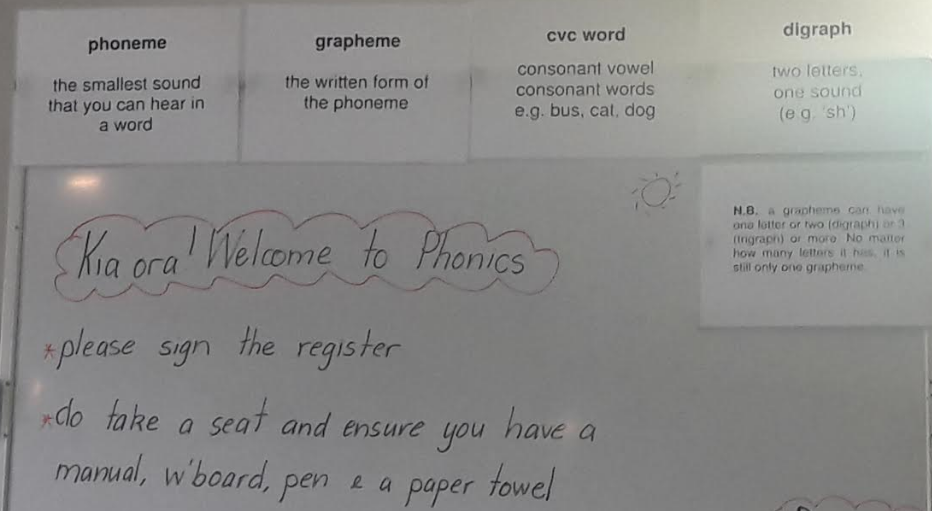
I've always incorporated Phonics into my literacy programme, but as I am constantly reflecting on my teaching and how it can be improved, I jumped when the opportunity to attend the 'Yolanda Soryl workshop' arose.

Yolanda confirmed the view I have that students need a range of basic phonics strategies so they can easily work out new words in reading and spelling.

Teaching tips and pointers: 
  • Allow only lower case letters to be written in phonics
  • Only have a reason for a capital letter like writing your name. When they write a capital letter in writing ask what the reason was for writing letter in capital - if no reason, rub out.
  • Only teach capital after lower case is secure

Summary:
  • Blending important for reading: d, d-o, d-o-g = dog
  • Break up word to write- segmentation
  • Some students know their sound, but don’t know how to break it up
  • Teach kids how to hear
  • The aim is to look at work and recognize it instantly
  • Read name before school - this is recognition of graphic knowledge
  • Teach high frequency words fast
  • Phonics is for low reading learners
  • Grammar - does it sound right. Get them to read their sentences back
  • Ingrain a sense of a sentence - repetitive reading
  • Teach students to re-read their writing, to check if it sounds right. 
  • 3 levels that students use to connect (sounds, words, sentences). Students that struggle don’t connect these three
  • Important to decode to enable them to comprehend
  • Book introduction important - look and introduce unfamiliar words
  • Teach fluency at word level - then you have chance to read page
  • Dyslexic kids tend to use both sides of the brain
  • Hear low level reader read out loud every day to improve reading outcome
  • Phonics is about using sounds, not only knowing sounds

I am also looking forward to the release of the Phonics App which can be used to learn/revise the alphabet sounds. It also follows a Phonics 'Hear, Read, Write' lesson plan and can stand alone or be used to revise a lesson. The App features a New Zealand accent which is so important for helping students learn the short vowel sounds.


~ "It shouldn't matter how slowly a child learns, as long as we are encouraging them not to stop" - Robert John Meehan ~

Wednesday, May 10, 2017

A Librarian on Blogging Journey

When helping to set up for the MindLab session, I was approached by Mary about my work at Ngā Pūmanawa e Waru. I explained to her what I am capable of helping with… She mentioned that she would like help with setting up a blog for their library and we arranged for a time to meet and to get the ball rolling.

This morning, we created a blog, added pages, added important links and information on to it. I also showed her how she could create posts. Mary was very excited and happy with the outcome and asked that I checked in regularly when helping at MindLab to see that see is going well.


Feedback from librarian via email:
“RHGS Library Blog
Professional Development:

To invite the expert – Marnel van der Spuy –Ngā Pūmanawa e Waru to deliver professional development to show me how to make a blog.

This session is the first of ongoing assistance of how to make a blog. It was amazing to have such expert assistance that Marnel was able to provide. The assistance was professional, encouraging, and reassuring. It seemed to take her no time at all to establish the basic blog site we needed i.e. links, photos, advice, examples of blogs; as a real novice in terms of ICT literacy it was a pleasure to have someone who made your lack confidence seem OK with her calm, cheerful manner.

Hopefully Marnel is able to provide ongoing help when she comes in as part of her Mindlab visits or I can request future sessions to support this excellent beginning.”


~ "One person with passions is better than forty people merely interested" - Unknown ~

Wednesday, April 5, 2017

Building Teacher & Student Capability in GSuite

I just love working alongside teachers and students as part of my role as Learning Facilitator with Ngā Pūmanawa e Waru.

After meeting with the two teachers, it became clear that there was a need to provide teacher and student coaching in the use of a shared learning space online - Google Drive / GSuite.

I firstly worked with the year 6 students, showing how to create folders, change colour (if they choose), name the folder for the appropriate items/docs to be added into it. We also discussed how to make a copy if something is shared with them, add it to their drive and rename it. I also showed them how to share the document with their teachers and parents. The doc the teacher shared with the students beforehand, was to record their goals, date accomplished and evidence… I showed how they can add a link from their blog / doc (mentioned that they need to ensure that it is shared with the teacher, to enable her to view it) or how they can upload a photo.

I did all of the above with the Year 4/5 students as well, but after some questions, also showed them how to embed from a video into their individual blogs.

Both sessions went really well, with students having hand on experiences and ended up being engaged in adding learning into their folders.

Reciprocity:  The students continue to support each other throughout the sessions.

Feedback from the teachers: